Showing posts with label government transaction. Show all posts

Wednesday, March 15, 2023

How To Apply for Passport in the Philippines


Passport Application then:

The first time I applied for a passport years ago, I found the process to be too complicated and time consuming.  Passport application was done at the DFA Office in Pasay City where I was greeted with numerous fixers and legitimate-looking passport processing offices just outside the office building. There were too many people outside the area that I had a hard time finding the main entrance. I actually had the experience with one person who was clad in an office uniform but I had no idea whether she was from DFA or not.  When I asked her where the entrance was, she told me to get in one of the kiosks to have my picture taken even if I said that I already had the requirements with me.  Geez...they screened my documents, led me into their booth, took my pictures then asked for payment.  :-)  After payment, only then I was told what gate to enter and it finally dawned on me that I was actually scammed. That was because I was clueless of the process that time.

For helpful tips in making a travel plan..READ HERE >>

Discover how a travel planner can make a big difference..KNOW MORE >>

Passport Application Now;

Anyway, that was years ago.  Today, the passport application has dramatically improved. Thanks to new developments in information technology that we can now set an appointment at the DFA for passport application using the internet at the comfort of our own home.

Whether you are applying for new or renewal of passport, DFA now requires an online appointment. Applicants will not be admitted at the entrance gate without valid appointment and application forms. This online appointment is free of charge.  Here is a step by step guide to help you through it.

1.  First determine the nearest branch to you where you want to set an appointment, (you can choose whatever branch that is most convenient to you).
DFA Branches:
(a) DFA Aseana in Macapagal Boulevard, Pasay City
(b) DFA NCR West located at the 5th floor of SM City Manila, Arroceros St. (just across the Manila City Hall)
(c). DFA NCR Central at Robinsons Galleria in Pasig City
(d). DFA NCR East at SM Megamall in Mandaluyong City
(e). DFA NCR South in Metro Alabang Town Center Muntinlupa City
(f). DFA NCR Northeast in Alimall Government Center Cubao Quezon City

2.  At the DFA Website Branch Selection page (http://www.passport.com.ph/choose-branch), select your preferred branch.  You will be taken to the instructions/reminders page.  Go through it and read carefully.

3.  If you have already read the instructions, click the "Set an Appointment" link.  That will take you to a new page where you will again be reminded of important pointers in applying for passport.  If you intend to apply only for yourself or for one person, click the "Start Individual Appointment Process" button. If you are applying with your family, click the "Family Application Form" link.

3. You will be directed to the passport application form.  Fill in all required information, be sure that all information provided are true and that it can be sufficiently supported by your documents which you will attach with  your application such as birth certificate, identification cards etc.  If you are applying for renewal of passport, you need to provide your old passport number so be sure to have that with you.  Also, ensure that the email address you provide is your own working email since all communications related to your online appointment will be sent to this email address.

4.  Review all the information that you provide before you click the Submit button.  Any false information you supplied could be grounds for non-issuance of passport.

5.  You will be asked for the date and time that you preferred when to visit your selected branch for the personal appearance.  All passport applicants of 0 age above are required to have a personal appearance since biometrics information such as photo will be taken.

6. Check you email from DFA Consular Office.  It contains your passport application reference number and a link to print your passport.

7.  Print your system-generated application form on a Legal Size paper and complete all the required documents stated in the email. Do not sign on the passport application just yet, you will sign on the document personally before a DFA Officer once you visit the branch.

8.  Photocopy all the necessary documents before proceeding to DFA Office because applications will not be processed if you do not have complete set of photocopies of your documents (at least two or three sets of photocopies will be fine plus your original papers).

8.  At the date of your appointment, be at your selected branch at least thirty minutes prior to your appointed time.  Be sure to have the required amount for the passport processing fee and delivery fee if you opt to have your passport delivered to you.  The processing fee for rush/passport is slightly higher than for regular passport (at the time of this writing 950.00 for regular processing).

9.  Once inside the DFA Office, you will be directed by their friendly staff on the step by step process such as the following:
      a. Get your queue number at the Information Counter and sit on the waiting section of the Processing Area.
      b. Wait for your queue number to appear on the monitor indicating what processing window you will go to.
     c. After processing, proceed to the Cashier's area. Pay the applicable passport processing fee
    d. After payment, proceed to the Encoding Section for data capturing.
    e. After your photo is captured, personal details and biometrics are encoded
    f. If you opted for delivery, proceed to delivery counter to pay for delivery fees, the expected date delivery will be recorded on your receipt so you only need to wait for your passport to be delivered to your designated address.
    g. If you opted to pick up the passport at the claim counter, just present the claim stub on the date indicated at the same branch where you made your application.

There goes the very easy process of passport application.  You now have less worries of being scammed or annoyed by fixers as what I experienced before.

After getting your passport, then your travel visa, you are now on your way to exploring the world 😍 You can also opt to try some visa-free countries. Head on to an airline websites such as AirAsia and check out seat sale offer to save on your flight fare.

Tuesday, June 14, 2016

Q and A on SSS Maternity Benefit Part 4

As part of Unsullied Perspective's public service, here is another round of question and answer on SSS maternity benefit package. SSS members who lodged their concerns here were only given advice to the best of the author's knowledge.  SSS members are encouraged to visit your SSS servicing branch to resolve your maternity benefit issues and other concerns.


Q. gud pm ask ko lang po my makukuha pa po ba me maternity last pay ko nung march 2015 then hindi na po me nkapaghulog..due date ko discoming june pwede pb me maghulog?? - Anonymous on 5/27/16

A. If your due date is on June 2016, you need to have at least three months contribution within January to December 2015 to be qualified and you should have notified SSS.

Q. hi ms arlene. Panu po pla kung gusto ko na po bumalik sa work, hindi ko na tatapusin ung 60days leave. 60days parin po ba babayaran sken ng sss? –Anonymous on 5/16/16

A. You are entitled to the 60 days maternity benefit for normal delivery.  That is a benefit given to you to give you time to attend to your newborn and to recuperate fully.  If you wish to return to work earlier than the 60 days period, you should clear it with your employer if you will be compensated for the work done.

Q. Hi, po maam. Ask ko po, ngayong buntis po ako pwede po ba ako makakuha ng maternity loan, kung ang nahulog ko lang ay hanggang nov. 25 2015 to jan. 15 2016. Tnx po maam.

A.  Hindi po loan o utang ang maternity benefit na binibigay ng sss.  Wala po kayong ibabalik na kabayaran sa perang makukuha nyo as maternity benefit.  Privilege po ito ng pagiging member ng SSS. Kung sakali man po na qualified ka, ang perang makukuha mo ay hindi mo na kailangang bayaran dahil hindi po iyon loan o utang.  

Q. good pm po. im faith po. ask ko lang if qualified po ko kumuha ng marternity benefit. last hulog po sa sss ko is nun nov. 2012. if maghulog po ko for jan. dis yr as voluntary till manganak po ko ng oct. may benefit po ko makukuha? thank you po , by Ching Rapas on 5/15/16

A. If October ang due date mo, you need to have at least three months contribution from June 2015 to May 2016. 

Q. Hi, Maam arlene, ask ko po. Paano kung nov. 25,2015 hanggang jan. 15 2016 lang ang nahulog ko sa Sss ko, pwede po ba ako makapag maternity loan, ngayong buntis po ako. Pwede po ba yun.. Tnx po on

Due date ko po sa dec 2016. Ask ko po kung maavail ko pa po ung maternity benefit kung ang contribution ko ay oct.2013 to may 2015. 2Nd baby ko na po ito at ngamit ko na sss maternity ko 8months ago sa 1st baby ko. Thank you po. Pls reply.  Anonymous on 5/14/16

A.      There is a chance that you will be qualified, better submit the MAT1 form as soon as possible at an SSS branch to be sure.

Q. Hi. . ask ko lng sna if pwde ko ma avail mat. Ko due date ko oct last wk. Tapos last year july 2015- jan 2016 lang aq nkapaghulog. Qualify po ako ? Anonymous on 4/28/16

A.  There is a chance you will be qualified since may hulog ka within the prescribed period.  Better submit the MAT1 form as soon as possible.

Q. Hi ms.arlene Ask ko lng po kung makakakuha Ako ng maternity benefits kung hindi nko nkakahulog ngaun ng monthly contribution?.last payment ko po is january 2016..estimated due ko n manganak is aug.2016 nkapag file nko ng mat1 ko.

A.  For as long as you have the required contribution, and since SSS already accepted your submitted MAT1, it means qualified ka naman.  During MAT1 submission, SSS already evaluates if you qualify.
 
Q.  paano kung sa loob ng isang naka-pagloan si member tapos mabuntis sya, makaka-avail pa ba sya ng maternity benefits sa SSS,. please answer. thanks on 4/22/16

A. You can avail the maternity benefit even if you have outstanding loan with SSS for as long as you qualify with all the requirements. But be aware that SSS might deduct the loan arrears from your benefit.  So it is possible that you might or might not get your mat benefit, the good side is you have paid off your loan.

Q. Nakapagfile napo ako ng mat 1,,den jan 2016 me nanganak at diko pa po nakakapunta ulit s sss..ung birth certificate ni baby kakakuha ko lng po last month from the hospital. Yun na rin po ba ang ipapasa s sss? At ilang months po after giving birth kailangan maifile ang mat 2 for maternity benefits? Unknown on 4/17/16

A.      You can still file your claim with SSS, just complete the documents required for submission.

Q. Hi po ask lang kung ang due date ko ay December2016 anun month po dapat ako may hulog..please reply. Thank you po  Anonymous on 4/8/16

A. You need to have contribution from July 2015 to June 2016 for at least three month within that period.

Q. Hi i just wanna ask if a mother can still file her maternity benefit even after she gave birth her baby? Linny Oporto on 3/27/16

A. If you have filed your MAT1 prior to giving birth and you have the required contribution, you can still file your MAT2.

Q. Gus pm.mkkatanggap b ako ng maternity benefit s July po ang due ko.Jan p po ako ng start magbayad.tnx on How to Compute the SSS Maternity Benefit Anonymous on 3/19/16

A. You should have filed your MAT1 prior to giving birth and you should have the required contribution from April 2015 to Mar 2016 for at least three months to qualify.

Q. Paano po magfile ng maternity pagpunta ko sa SSS . 5months pregnant na po ako . kaso 6months lang po hulog ng SSS ko . Thanks po laika on 3/8/16
A.  You can file online or through an SSS branch. You need to file the MAT1 prior to giving birth and the MAT2 after giving birth.
Q. If accepted lang po nakalagay? Okay na po ba yun ?
A.  If your MAT1 has been accepted online, that means that you have successfully submitted your notification.  You need to attach the email notification to your MAT2 as proof that you have submitted your MAT1 online.

Saturday, August 22, 2015

How to Update your Comelec Registration to be Biometrics-Ready


I received a letter from the Commission on Elections (Comelec) informing me to update my registration details particularly my biometrics information.  I am an active voter since I first  registered when I reached legal age (don't ask...that was decades ago ha ha). But,  I did not bother to update my details when biometrics capturing was implemented at the time of electronic voting in 2010 since it was not required that time.  But Comelec is now updating its voters registration records and it includes biometrics information.  Also, you will not be able to vote in the 2016 election if your record is not biometrics ready according to Comelec.  Here is the announcement posted in the Comelec's website that I reposted here for information.


"Mandatory Biometric Capture

Now, by virtue of Republic Act No. 10367, all voter registration records are mandated to have biometrics information. All new applications already require the mandatory capture of the applicants' biometrics using the COMELEC's Voter Registration Machine (VRM), which utilizes a digital camera, a fingerprint scanner and a signature pad.

Due to this new law, which was signed by Pres. Benigno Aquino III last 15 February 2013,  all previously registered voters without biometrics are required to subject themselves to biometrics capture through the validation procedure. Failure to do so before 31 October 2015 would cause COMELEC to deactivate the concerned registration records resulting to the non-allowing to vote in May 2016 of the affected voters."
I was hesitant to visit the Comelec's satellite office thinking that it would be a long and difficult process.  Had it not been one of my child's school entrance requirements where enrollees are required to submit the parent's certification of voting records, I guess I would still postpone my visit at a later date.

Anyway, I was surprised that it only took me less than an hour to do my transactions in Comelec.  When I get to my assigned registration office, I was asked by their staff of my purpose and told them about the letter I received and my request for a copy of certification.

First I was invited to get in the office and I was asked about my personal details so the staff could search for my records thru their computer terminal.  After that my photo was taken and then my left and right thumbprint were captured thru a fingerscanner.  I was also asked to sign on a signature pad to complete my biometrics info.  Voila! Everything was done in less than ten minutes.  Now I am assured that I will not be denied of my right to vote since I already had my records biometrics-ready.

Next I was instructed to wait outside for my name to be called while my request for certification was being processed.  After only about five minutes, I was told to photocopy a page from the Book of Voters of the last election bearing my name and signature that served as proof that I voted.  After that, I returned the voter's list with the photocopy.  I waited around a minute and when I was called,  paid P75.00 for the release of the Certification of Voting Record. It was that fast and simple.


Friday, August 7, 2015

How to File Online for an SSS Salary Loan Application

SSS provides loan facility to its qualified members and one of these loan offers is the salary loan.  As an added service to SSS online users, a member can file their salary loan application thru the SSS website.  To be able to use this service, you need to log in to your SSS account, if you are not yet registered as an online member, go to SSS website and fill out the Online User ID Registration.  Click here to learn how to register online.

The good thing with the online salary application form is it is more simplified than filling out the paper-based SSS application for salary loan form.  You also save time in going to the SSS branch just to submit your documents.  Also, by using the online application you will be informed right away if you are entitled to this benefit based on your monthly contribution.  Read on to know the four simple steps to do in applying for SSS salary loan.

1. After successfully logging in to your account, navigate to the E-SERVICES menu then click the APPLY FOR SALARY  LOAN link. 
2. You need to fill out an online form that requests for required information such as loanable amount which you can select from the drop-down box (that is system-generated/computed amount), mailing address and postal code and tick the I agree to the terms and conditions. 

3. After you filled out the required fields, the site will require you to confirm your submission, just press the OK button to continue and just wait for the email confirmation from SSS.


4. So after you have successfully submitted your application online, you will receive an email message of  your Salary Loan Confirmation  informing you of your successful submission with transaction number.   

5. After two to three days, you can check online as regards the status of your application.  Navigate to the E-SERVICES - INQUIRY menu then  select LOANS - LOAN STATUS/LOAN INFO menu.  The "Check Generated" status will appear under the Loan Information Details which means that your check  or a registered mail is about to be delivered to you. 

Recently when I tried this online loan application, the check was not delivered to my address.  Instead, I received a registered mail to claim my check at the post office after around three weeks of waiting.  Anyways, so long as I have the check, the wait is just worth it. 


Update: There is an SSS mobile application called SSSMobile that you can download from the AppStore or PlayStore.


Saturday, October 25, 2014

How to Apply Online for NBI Clearance

At the start of the year 2014, we were greeted by news report about the long lines of people seeking clearance at the office of the National Bureau of Investigation (NBI).  Apparently, NBI was migrating their system to a new one and NBI Officials explained that once the process of tranferring to the new computerized system was completed, the long lines would ease up.  I remember the time when I first applied for NBI clearance I spent the whole day waiting in line.  Although a computerized system was already in place at that time, the application process still took that long and there was no chance you would get your clearance on that same day.  After I went through several windows where I filled out the application, paid at the cashier and queued for picture and data capturing, I was informed to be back on another day, earliest would be three days for the release of clearance. That was, they needed to verify my records to see if I did not have offenses or if I have same name with another who had criminal record.  So the release of clearance still depend only if there would be no problem with my records otherwise I would need to go back possibly on another day again to provide proofs of my identity.

That was the tedious process of applying for NBI clearance at the NBI Main Office years ago. Eventually, the process improved when they opened satellite branches in malls and other offsite offices.  So it was really big news when long queue started to pile up again earlier this year.  Understandably,  it was the result of the Bureau's quest to improve the system and what a better way to do it than to make its services available thru the internet.  So today, I had the chance to finally use the Online NBI Clearance Application.  Here is the step by step guide to help you through the application process.
1.  From the NBI website, select from the menu Clearance Registration Application.  A new form will be displayed.
2. Fill out all pertinent information. Select NEW for first-time applicants and RENEWAL for those who have previously issued clearance.
3. Fill out Applicant information, Contact details, family background, and other information.
4. After filling out the application, click SUBMIT.  A reference code will be provided once the application is successfully submitted.  You can copy this reference code or print your system generated application form. If you do not have printer, just be sure to have the reference code when you go to NBI office.
5. You can then proceed to the NBI Office in Manila.  Pay the corresponding fee and proceed to picture  and biometrics capturing.
6.  If there is no significant findings in your record, you can get your clearance on the same day.

So there goes the easier process for applying NBI clearance. The process seem to have been significantly streamlined with the online application process.  Even the waiting time for the release of clearance has greatly reduced from days to just a matter of hours. Maybe next time they could come up with an online payment so that applicants no longer need to queue at the cashier. But, generally, the improved process is a real great feat!


http://eymisdomain.blogspot.com/2014/10/its-time-for-our-november-fun-treat.html

Wednesday, September 3, 2014

How to File for PhilHealth Maternity and Newborn Care Package

Updated Step by Step Guide on how to apply for SSS salary loan online

------------------------------------

Some of our blog readers requested for a post about Philhealth that will help them defray the cost of maternity related expenses.  Do you know that Philhealth members can also avail of the Newborn Care Package aside from the maternity care package? That means aside from the hospitalization benefit accorded to members, your newborn is also covered by your Philhealth. I have summarized for you the steps to avail of this benefit.

For employed members:
Before you take your two months maternity leave of absence from work, make sure that you have already inform your HR Department that you will avail of the Philhealth.  That will give them ample time to prepare your Certificate of Monthly Contribution that you will need as supporting document to your claim form.
Should you wish to accomplish the form before your scheduled leave:
1. Download a copy of the CF1 form from the Philhealth website and print two copies. You need two copies, one for you and one for your baby, that means two Philhealth claims.
2. Accomplish two copies of the CF1 or Claim Form 1 and have the Employer Information part be signed by your company's authorized representative.
3. If you are admitted to a Philhealth registered hospital, inform the admitting personnel that you will use your Philhealth. They usually provide the claim forms CF1, CF2 and for newborn care package CF3.  The CF2 and CF3 will be accomplished by the hospital or clinic. That means you only need to submit your previously accomplished CF1 with your certificate of contribution.
4. Once you completed all forms, submit it to the hospital's Philhealth personnel prior to your discharge for them to compute the Philhealth benefit that shall be deducted from your hospital bill.  The forms to be submitted are:
     a.   For you (maternity package): CF1, CF2 and certification (this entitles you to 6,500 normal delivery and 19,000 caesarean delivery of maternity benefit deducted from your hospital expenses)
       These documents are usually submitted to the philhealth personnel in the hospital prior to discharge.

     b.   For baby (newborn package): CF1, CF2, CF3, your certificate of contribution, baby's birth certificate and the newborn screening stub that will be provided to you by the hospital. (This entitles you to 1,750 maximum benefit).
      These documents are usually submitted to the hospital after you secure your child's birth certificate and newborn screening test result. You can submit your claim to the hospital for them to forward to Philhealth or you can go directly to Philhealth office to file this claim.  Make sure that you file this within the 60 days period.

For voluntary/self employed members
You need same forms as above CF1, CF2, CF3 but instead of certificate of contribution, you need to attach the Member Data Record (MDR) that you can get from Philhealth office. And you also need to provide copies of latest receipt of payment of monthly contribution.

By the way, included in the newborn care package are BCG and Hepatitis  B vaccines, vitamin K administration , eye prophylaxis, the newborn screening test, and breastfeeding advice/counselling.

Remember, if you are a paying member you are entitled to these benefits.

If you are not yet a member of Philhealth, it is best to act now. Read our post on how to register online. Read More...


Monday, March 10, 2014

How to Compute the SSS Maternity Benefit

Updated Step by Step Guide on how to apply for SSS Salary Loan Online

-----------------------------------------------------------------------------------------------
After you have successfully submitted your Maternity notification to SSS, the next question you probably have in mind is how much maternity benefit would you get. Prior to computing the amount of benefit, determine first the date range when the 12 month petiod would fall based on your expected date of delivery.


Let us say that you are expected to give birth in December 2014, exclude the semester of contingency from July 2014 to December 2014. Count 12 months backward. The 12 month period would be from July 2013 to June 2014.  These are the important dates that you need to have at least three months contribution to qualify for maternity benefit. Get your six highest monthly salary credit within that period,

Scenario 1
If you pay premium payments from January to June 2014 that corresponds to the  16,000 salary credit (that means you are paying the maximum monthly contribution as voluntary member (based on the 2014 schedule) with 1,760.00 monthly), the computation of your maternity benefit would be as follows:

  1. Add the six highest monthly salary credits to get the total monthly salary credit.
    16,000 x 6 months = 96,000
  2. Divide the total monthly salary credit by 180 days to get the average daily salary credit. This is equivalent to the daily maternity allowance.
    96,000 / 180 days = 533.33
  3. Multiply the daily maternity allowance by 60 (for normal delivery or miscarriage) or 78 days (for caesarean section delivery) to get the total amount of maternity benefit.

    533.33 x 60 days = P 32,000 for normal delivery
    533.33 x 78 days = P 41,600 for caesarean delivery
Scenario 2

If you pay premium payments from July 2013 to December 2013 that corresponds to the  15,000 salary credit (that means you are paying the maximum monthly contribution as voluntary member (based on the 2013 schedule), afterwhich you only pay 550.00 monthly contribution from January to June 2014 which is lower than your previous payments, the computation of your maternity benefit would be as follows:


  1. Add the six highest monthly salary credits to get the total monthly salary credit.
    15,000 x 6 months = 90,000
  2. Divide the total monthly salary credit by 180 days to get the average daily salary credit. This is equivalent to the daily maternity allowance.
    90,000 / 180 days = 500
Multiply the daily maternity allowance by 60 (for normal delivery or miscarriage) or 78 days (for caesarean section delivery) to get the total amount of maternity benefit.

500 x 60 days = 30,000 mat benefit for normal delivery
500 x 78 days = 39,000 mat benefit for caesarean delivery

Scenario 3

You missed premium payments from July 2013 to December 2013 but you have payments from January to June 2014 with corresponding salary credit amounting to 5,000 (or you paid 550 monthly) your computation would be:
5,000 x 6 months = 30,000
30,000 / 180 days = 166.66 daily mat benefit
166.66 x 60 days = P 10,000 mat benefit for normal delivery
166.66 x 78 days = P 13,000 mat benefit for caesarean delivery

Scenario 4
You have premium payments from July 2013 to September 2013 with 5,000 salary credit (that means you have paid 520.00 monthly contribution). Then for some reason you failed to pay for the succeeding months. As the requirement requires you

to have at least three months contribution within the twelve month period preceding your semester of contingency, you still qualify for the benefit however you will only get this amount
5,000 X 3 months = 15,000
15,000 / 180 days = 83.33 daily maternity benefit
83.33 X 60 days = P 5,000 maternity benefit for normal delivery
83.33 X 78 days = P 6,500 maternity benefit for normal delivery


There you go...keep in mind, the higher your monthly contribution payment, the higher maternity benefit you will get.

And here is another post to help you in your finances. Find out how you can claim maternity and newborn care package thru Philhealth. 


Saturday, January 18, 2014

How to Know the Correct SSS Premium to Pay Based on the 2014 Contribution Schedule

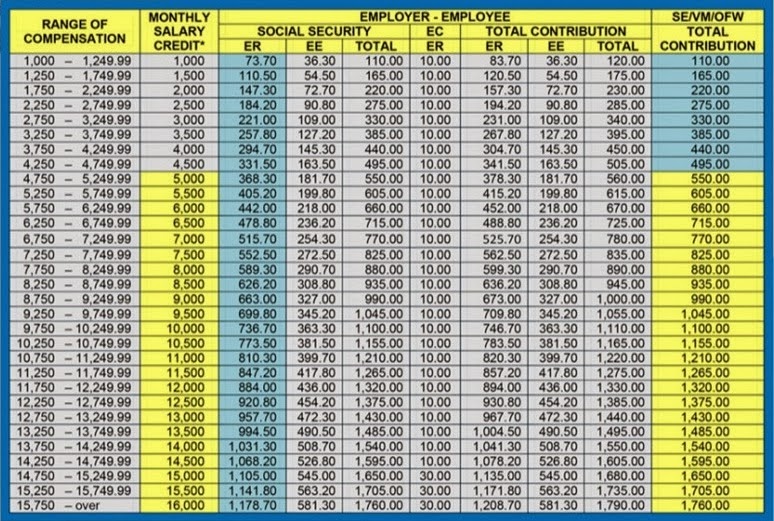
Effective 1 January 2014, a new table of contribution for SSS premium should be followed. All employed, voluntary/ self-employed and OFW members must pay their premium contribution based on this new schedule.Also, the maximum salary credit (MSC) has been increased from 15,000 to 16,000.

click this image to open in another tab for a larger view

Here is how you should check the amount of your monthly contribution based on the 2014 contribution schedule:

For employed members, your range of compensation is based on your basic salary. Say you have a basic salary of 20,000.  Your range of compensation will fall under the '15,750' and over and your monthly premium shall be 1,790.00.  Your employer shall deduct from your salary the amount of 581.30 and the remaining amount of 1,208.70 shall be shouldered by your employer.

For SE/VM/OFW, the range of compensation is based on your declaration.  For OFW, the minimum shall be 5,000.  Say your declared earning is 6,300 monthly.  Your range of compensation shall fall under the '6,250 - 6,749.99' with an MSC of 6,500.  That means you need to pay 715.00 as your monthly contribution. 

Reminders:

Self-employed, voluntary and OFW members who already paid their contributions in advance from January 2014 onwards based on the old contribution must settle the underpayments to retain the posting at the same MSC otherwise, the lower MSC shall be applied.

http://eymisdomain.blogspot.com/2014/09/unsullied-perspective-fun-treat-2-for.html


Friday, September 6, 2013

How to Check your SSS Contributions Online


Whether you are employed, voluntary, self-employed or OFW SSS member, you can readily check your premium contribution through the SSS website.  But before you can avail of this service, you need to register first with the My.SSS portal.  My.SSS is an online service provided to members to check their records, contributions, loan status and other related services.  Click here to learn how to register in My.SSS to avail of the SSS online service.

1. If you are already a member of this online service, you can gain access to your records by logging in to your account.

2. Click the Online Inquiry from the menu located in the left-most side of the screen.

3. There are two ways to check your premium contributions,  in the Member Info menu and the Premium Payment menu. 

4.  To see all your premiums paid for every month and year, you can check it at the Member Info then click Actual Premiums.  It will also show you your total contributions from all membership types (whether you were employed, voluntary member or self-employed.

5.  If you are a voluntary member, self-employed, household employer, and flexi-fund member, You can check your posted contributions in the Premium Payment menu.  The difference of the Premium Payment page from the Member Info page is that this displays the details of your payment such as applicable date, official receipt or special bank receipt number, payment channel and amount.

Through this service, you can readily check if you have payments not yet posted.  Coordinate with your servicing branch right away to request for correction and/or updating of your premium contribution. 

*************


http://www.eymisdomain.blogspot.com/2014/09/unsullied-perspective-fun-treat-2-for.html

Thursday, August 15, 2013

Paano Maging Miyembro ng SSS

Kung ikaw ay mag-uumpisa nang magtrabaho sa pribadong sektor sa Pilipinas, ang kumpanyang iyong papasukan ay nararapat lamang na kuhanin ang iyong Social Security Number (SSS) kung ikaw ay meron na nito at kung wala pa ay dapat na iapply ka ng iyong kumpanya para maging kasapi o miyembro ka ng SSS.  Ito ay nasa batas na kailangang sundin ng kumpanyang iyong papasukan.  Kung sakali man na hingin ng kumpanya ang iyong SSS subalit wala ka pa nito, narito ang mga dapat mong gawin;

1.  Kumuha ng SSS Form E1 (Personal Record), ito ay maari nang madownload o makuha sa website ng SSS na siya mong iprint para masulatan ng mahahalagang impormasyon ukol sa iyo.  Ito ay makukuha din sa pinakamalapit na opisina ng SSS sa iyong lugar.

2.  Isulat ang mahahalagang impormasyong hinihingi sa form at siguruhing tama ang lahat ng impormasyong iyong ilalagay upang maiwasan ang anomang problemang idudulot ng mali-maling detalye na ibibigay mo sa SSS. Ang mga detalyeng dapat mong isulat ay ang iyong buong pangalan, permanenteng tirahan, kasarian, araw ng kapanganakan, katayuang sibil at ang mga idedeklara mong mga makikinabang na mga pangunahin mong kamag-anak.  Pirmahan mo ang form at ilakip ang mga iba pang dokumento na kailangan.  Mangyaring itim na ballpen ang iyong gamitin sa pagsulat dahil ito ang nakalagay sa panuto o instruction.

3. Ang original at kopya ng iyong birth certificate, baptismal o pasaporte ang mga pangunahing dokumento na maaari mong isama sa iyong E1 form. Maari mong gamitin ang isa sa mga nabanggit. Kung sakaling wala ka ng pangunahing dokumento, may mga iba pang dokumento ang maari mong magamit katulad ng school ID o voters ID, driver's license, marriage contract o birth certificate ng iyong anak.

4.  Kung makompleto mo na ang E1 form na may kasamang suportang dokumento, (siguruhin na dalawang kopya ang dala mo ng ipapasa mo sa SSS), maari ka na pumunta sa pinakamalapit sa opisina ng SSS upang ifile ang iyong aplikasyon para sa SSS number mo.

5. Ang iyong ipinasang mga dokumento ay bubusisiin ng nakatakdang verifier at kung tama naman ang lahat ng iyong nasubmit, saka ito tatatakan ng kaukulang numero.  Ito ang magiging panghabambuhay mong SSS number na hindi mo dapat kalimutan. 

5. Maari ka na mag-umpisa sa paghuhulog ng kontribusyon mo upang maging aktibong miyembro ka ng SSS. Tandaan na dapat na tuloy-tuloy ang iyong hulog ng kontribusyon upang magamit mo ang mga benepisyo ng pagiging kasapi nito. 


Thursday, August 1, 2013

Paano Magparehistro sa SSS sa Pamamagitan ng Internet

Kung ikaw ay isang kawani sa pribadong sektor, maaring naranasan mo na rin ang hirap sa paglalakad ng mga papeles sa SSS para sa kailangan mong impormasyon na may kaugnayan sa iyong kontribusyon,utang, bayad sa utang, at mga benepisyo.  Maaaring minsan ay nainis ka na rin sa napakahabang pila na kailangan mong bunuin para lamang magtanong kung nairemit na ang iyong bayad. Maaaring nangalay na ang iyong daliri sa kakapindot sa telepono para sa pagtawag sa SSS hotline na talaga namang super hotline dahil sa hindi mo na makontak.  Ngayon ay mababawasan na ang iyoyng pagkaasar dahil meron na ang SSS na isang paraan para makipag-ugnayan sa publiko na hindi na kailangan pang magsadya sa opisina ng SSS. Sa loob mismo ng iyong bahay, sa opisina o kahit saang lugar na merong internet connection ay maaari  mo nang makita ang mga pangunahing impormasyon ukol sa iyong SSS.  Upang magawa mo iyan,  nararapat munang magparehistro ka bilang online member sa SSS.  Heto ang mga hakbang kung paano:
1. Magpunta sa website ng SSS, www.sss.gov.ph
2. Iclick ang "Not yet registered in My.SSS, Sign up as a Member" link na matatagpuan sa Member Login part.
3. Sagutan ang mga impormasyong hinihingi sa form base sa mga detalye ng iyong pagiging SSS member


4. Pagkatapos maisulat ang kailangang detalye, isubmit ang form.
5. Makakatanggap ka ng mensahe sa iyong ibinigay na email na may titulong "SSS Website Email Validation"
6. Iclick mo ang link na ibinigay sa email upang maipagpatuloy ang iyong pagrehistro
7. May bagong form na lalabas pagclick mo sa link at ito ay dapat mo rin sagutan base sa impormasyon na naipasa mo na noon sa SSS pagapply  mo ng iyong SSS number

8.  Siguruhin mo na tama ang mga impormasyon na ilalagay mo sa form dahil hindi ka makakarehistro sa online website kung hindi tama ang mga detalye mo.
9.  Tandaan ang username at password na gagamitin mo dahil ito ang mga kailangan mo sa paglogin sa My.SSS kung maaprubahan na ang iyong rehistro sa online.
10. I-tick ang "I accept the terms and conditions" matapos mo itong mabasa tsaka mo pindutin ang Submit button.
11. Makakatanggap ka ng panibagong email na naglalaman kung naaprubahan ang iyong rehistro.  Kung naaprubahan, maari ka na maglogin sa My.SSS.
12.  Maaari ka na magtransact online ng mga kailangan mo sa SSS katulad ng pagcheck sa iyong contribution sa lahat ng petsa mula sa umpisa ng iyong pagiging miyembro ng SSS hangang sa kasalukuyan,
13.  Maaari ka na magfile ng loan, ng maternity notification, at maaari mo rin malaman kung magkano ang iyong makukuhang pera base sa estimate.
14. Pwede mo na agad malaman kung ikaw ay maaari na muling mangutang kung meron ka existing loan.
15.  Pwede mo na rin ifile ang contribution ng iyong kasambahay kung meron ka man kasambahay.

Ang mga nabanggit na transakyon ay ilan lamang sa maraming serbiyong pwede ninyong magamit sa SSS online website.  Hindi na ninyo kailangan pa pumunta sa opisina ng SSS para lamang magtanong.  Mas bawas na ang hirap at gastos na kailangan para makipagugnayan sa SSS.

Tandaan:  Ang My.SSS ay para sa mga miyembro na ng SSS na may kaukulang SSS number na.  Kung ikaw ay wala pang SSS number, kailangan mo pa rin magpunta sa pinakamalapit na SSS office para maging miyembro. Basahin dito kung paano kumuha ng SSS number.

Kung meron ka pang katanungan, magiwan lamang ng komento at amin pong sasagutin sa abot ng aming makakaya.

Thursday, July 25, 2013

How to File an SSS Maternity Notification Online Thru My.SSS


Social Security System
Do you know that you can file your SSS Maternity Notification thru the SSS website?   This service is available to all members who are registered as online member.  This service is specially beneficial to self- employed and voluntary members.  If you file your maternity notification online, you do not have to go through the hassle of lining up at your SSS Servicing Branch to have the Maternity Notification (MAT1) Form and supporting documents submitted.  Unlike employed members whose Maternity I and II forms are submitted by their respective employers, self- employed and voluntary members have to file their maternity claims on their own that means extra time, effort, and expenses in going to an SSS office.  One of the improvements in SSS service is this maternity notification online.  To be able to use this service, you need to log in to your SSS account, if you are not yet registered as an online member, go to SSS website and fill out the Online User ID Registration.  Click here to learn how to register online.

Please check our growing list of Q & A on SSS Maternity Benefit >>

After successfully logging in to your account, navigate to TRANSACTIONS menu then click the Maternity Notification link.  You need to fill out an online form that requests for information such as expected date of delivery, number of delivery/miscarriage prior to current notification and date of last delivery/miscarriage.  Those are the same information that you will provide if you opt to submit your Maternity Notification Form directly at an SSS office.  The good thing with the online maternity notification aside from escaping the hassle of waiting in line is that you do not need to submit right away all the supporting documents needed.  Also,  you will be informed if you are entitled to this benefit based on your monthly contribution and an estimated computation of your maternity claim is also available online.  So after you have successfully submitted your notification, you will receive a message thru the site with reference number and an indicator that your MAT1 is online accepted.   You only need to print this confirmation page or email which will serve as your MAT1 form.   Attach to your Mat II Form together with supporting documents which you will later need to submit to your SSS servicing branch after securing the birth certificate of your child. One less hassle in going to the crowded SSS office just to submit your MAT1 Form.

If you want to know how much maternity benefit you will get please visit this post How to Compute your Maternity Benefit
If you have other questions related to filing your maternity benefits,  feel free to leave  your queries in the comment section. 

And here is also an essential information on how you can claim Philhealth Maternity and Newborn Care package to help you defray the cost of your maternity related expenses.
******************


Sunday, July 7, 2013

How to Register Online in PhilHealth

Last year, members of our family were frequent visitors in the hospital ranging from consultations to confinement.  Such incidents did not only drained us physically and emotionally but more so, financially.  The most difficult process in dealing with hospital confinements was how to pay the hospitalization fee especially when you were short of cash and you did not have any health insurance to cover such expenses.  My sister and her husband were self-employed individuals, earning not much to cover their family's daily needs thus an extra expense for a health insurance was obviously not in their budget.  It was too unfortunate that during that year, my sister, her husband and their son badly needed medical attention due to various illnesses that struck their family.  The three of them were hospitalized one after the other that we as their immediate family had to rescue them financially.  I never regret that I had to lose money to help defray the hospital expenses.  I would rather lose money than lose a family...but, what I regret was that they never had the chance to avail of health benefits that could have been a big help to them.  So while we were settling the bills at the hospital, we found out that Philhealth could have spared her at least 30%-40% of the total amount but since she was not a member, we needed to find that money to pay for it.

PhilHealth is a health insurance provided by the Philippine Government to eligible individuals. Membership is mandatory for employed individuals in the government and private sector.  Self-employed can also become a member under the individually paying program and there were also sponsored membership and for Overseas Contract Workers.  After that series of hospital confinements and hunting for money to pay for hospital bills, I resolved to help my sister in getting their family's own PhilHealth membership.  I was glad to find out that PhilHealth now has an online registration system.  So I told my sister about it and taught her how to go about the electronic registration process. Refer to the following steps:

1.  At the PhilHealth online registration site, she filled out an online membership registration form (you can also fill out a manual form downloaded from their site then submit it together with supporting documents at the PhilHealth office.)
2.  She then attached a scan copy of her documents such as their marriage certificate and birth certificate of her dependents.  (You can also opt to submit the documentary requirements directly at their office or send them through mail.)
3.  After successfully submitting the form online, an email was sent informing her that her application was received and will be processed.
4. After several days, another email was received with her PhilHealth Identification Number and a copy of her Member's Data Record (MDR).  Included in the email was an instruction to pay for the monthly contribution and the terms of coverage.
5.  She then went to the nearest SSS office to pay for her initial payment. At first she tried to pay for it at PhilHealth accredited collection partner but was declined when she said that it was an initial payment.  The cashier advised her to pay directly at PhilHealth so that was what she did.

For a minimum amount of 100 pesos per month (it has now been increased to 150 per month for those earning 25,000 and below), she and her family is insured of health benefits. That is only about five pesos everyday, cheaper than a bottle of soda :-) An advance payment covering one whole year is accepted but if you are short on budget, you can opt for monthly or quarterly payments. You only need to be sure to pay your premiums on time to be assured of continued coverage.  I hope that heads of the family who are not yet members of Philhealth resolve to be registered in this National Health Insurance Program of the government.  Philhealth may only pay a portion of your hospital bills but that is better than nothing at all.  That Philhealth benefit could save you lots of monies and woes than borrowing money from loan sharks that would trap you into deep debt because of high interest and get you into more troublesome days.

If you have friends or relatives who are not yet member of PhilHealth, give them a favor by informing them of this health insurance program.  This will give them less worries and an assurance that appropriate medical attention will be given to them when an incident arises. 

Friday, May 17, 2013

How to Get a Student Driver's Permit from the Land Transportation Office

2016 Update:  LTO now requires medical certificate as one of the requirements for student permit (SP) application.  You can have the medical certificate from any licensed practicing physician stating that you are fit to operate a motor vehicle.  They also now provide reviewer for the written exam once your SP card is released.


Yesterday, I accompanied my son in getting his student permit from the Land Transportation Office.  As I promised that I will enroll him in a driving school this summer school break to make his vacation worthwhile.  So off we went to the nearest branch from our place.  We arrived in LTO a little past one o'clock in the afternoon.  When we get inside the compound,  we went straight to the customer service booth right beside the gate.  I was surprised that it seems the licensing system has improved compared to previous years when fixers would be the first to greet you even before you get near the gate.   So when I asked the staff where we should file our application, he readily asked for the documents and checked its completeness.  We submitted the following, duly filled- out application for driver's license, a photocopy of my son's birth certificate with school ID, a parental consent that I signed since my son is only 16 years old, a photocopy of my valid ID and his 1x1 ID picture.  After that we were told to wait for his name to be called.  I stayed at the waiting area and let my son do the transaction on his own but still keeping an eye at every window that he approached.  There was a waiting area in front of the booth and in less than three minutes, my son's name was called.  He approached the booth and was asked for an original copy of his birth certificate to prove his identity.  After that he was told to wait again while his documents were checked.  He was given a number then told to submit the document to the evaluator inside the office.   He was assigned at window 6.  There were about eight evaluators so the process did not take that long.  After several minutes, his name was called at the photo section to have his picture taken.  We waited again then after about 10 minutes, his name was called at the cashier.  He paid 317.00 then instructed to wait again for a call from window 14  or 15.   We waited for about 20 minutes before his name was called at window 15 for the release of his student permit.

It was my son's first time to transact at a government office on his own and it was good that his experience in filing his license was generally problem-free.  If services from the government would all be like this, so much time and effort would be saved and most importantly, red tape seemed to have been eradicated unlike in the past.  LTO's fast service is really worthy of acknowledgement.  BIG improvement, indeed!  Keep it up!

As for my son, he was all too excited to start his training at Smart Driving School.

*************************